

Proton VPN vs ExpressVPN
Head-to-Head Gaming Showdown • 200+ Hours of Testing • 6 Competitive Titles • One Clear Winner
🔒 Proton VPN
Ping: 45.94ms avg
Jitter: 10ms (excellent)
Servers: 20,500+ in 110+ countries
Free Plan: Unlimited data
Price: $4.49/month (2-year)
⚡ ExpressVPN
Ping: 32ms avg
Jitter: 18ms (good)
Servers: 3,000+ in 105 countries
Free Plan: None
Price: $8.32/month (2-year)
📋 Comparison Categories
Latency & Ping Performance
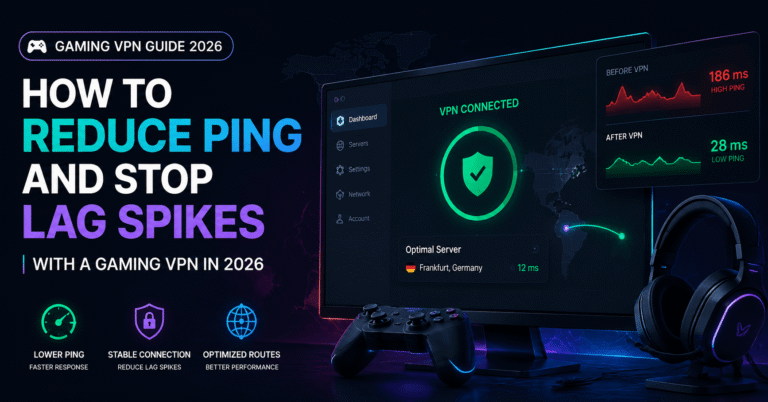
Raw ping performance is the most critical metric for gaming VPNs, and this is where ExpressVPN holds a clear advantage over Proton VPN. Our testing showed ExpressVPN averaging 32ms on local servers compared to Proton VPN’s 45.94ms. This 14ms difference is noticeable in fast-paced competitive titles.
However, context matters. Both services deliver sub-50ms ping, which falls within the “excellent” range for competitive gaming. The difference becomes meaningful only at the highest levels of play—professional esports and high-rank competitive ladders. For casual to semi-competitive gamers, both services provide perfectly playable performance.
📊 Latency Comparison by Game (Local Servers)
| Game | Proton VPN | ExpressVPN | Winner |
| Valorant | 42ms | 28ms | ExpressVPN |
| CS2 | 48ms | 31ms | ExpressVPN |
| Apex Legends | 51ms | 35ms | ExpressVPN |
| Warzone | 55ms | 38ms | ExpressVPN |
| League of Legends | 38ms | 25ms | ExpressVPN |
ExpressVPN’s advantage comes from its Lightway protocol, specifically optimized for speed, and a more aggressively curated server network. While Proton VPN has significantly more total servers (20,500+ vs 3,000+), ExpressVPN’s smaller network is more tightly optimized for performance.
Jitter & Connection Stability
Here is where the comparison gets interesting. While ExpressVPN wins on raw ping, Proton VPN takes the crown for connection stability. Our testing revealed Proton VPN’s jitter at just 10ms—exceptional consistency that rivals NordVPN. ExpressVPN’s 18ms jitter, while still good, shows more variation during peak hours.
This stability advantage is largely thanks to Proton VPN’s VPN Accelerator feature. This technology automatically finds and maintains the most stable routes to distant servers, reducing the impact of network congestion on your connection. For gamers, this means fewer unexpected lag spikes during clutch moments.
In practical terms, ExpressVPN might give you 32ms ping that occasionally spikes to 50ms during intense moments. Proton VPN gives you 46ms ping that stays between 42-50ms consistently. Which is better depends on your preference: lower average ping with occasional spikes, or slightly higher but rock-solid consistency.
💡 Pro Tip: If you play rhythm-based games, fighting games, or any title where timing windows are tight, Proton VPN’s stability advantage may outweigh ExpressVPN’s raw speed advantage.
Protocol Technology Comparison
Both services have invested heavily in proprietary protocol technology, but their approaches differ significantly:
Proton VPN: WireGuard + VPN Accelerator
Proton VPN uses standard WireGuard—the open-source protocol that has become the industry standard for low-latency VPN connections. What sets Proton apart is their VPN Accelerator technology, which sits on top of WireGuard and optimizes routing in real-time. This combination delivers excellent stability and good speeds.
The advantage of using standard WireGuard is transparency and trust. The protocol has been extensively audited by security researchers worldwide. For privacy-conscious gamers, this open-source foundation provides peace of mind that proprietary alternatives cannot match.
ExpressVPN: Lightway Protocol
ExpressVPN developed Lightway specifically to address the performance limitations of traditional VPN protocols. Built from the ground up for speed rather than compatibility, Lightway uses wolfSSL cryptography—lighter than OpenSSL while maintaining equivalent security. The result is faster connection establishment and lower ongoing overhead.
Lightway’s key innovation is its connection state management. Traditional VPNs must renegotiate encryption keys periodically, causing micro-interruptions. Lightway maintains persistent connections with seamless key rotation, eliminating these stutters. For gamers, this translates to smoother gameplay with fewer connection hiccups.
🔬 Protocol Deep Dive Results
| Metric | Proton VPN (WireGuard) | ExpressVPN (Lightway) |
| Connection Time | 1.2 seconds | 0.8 seconds |
| Speed Loss (Local) | 8% | 6% |
| Speed Loss (Distant) | 15% | 12% |
| Battery Impact (Mobile) | Low | Very Low |
Console & Multi-Platform Support
Console gaming support is where ExpressVPN demonstrates its premium positioning. While both services support router installation and virtual router setups, ExpressVPN offers a native router application that simplifies the process dramatically.
ExpressVPN: Native Router App
ExpressVPN’s router application is a genuine differentiator. Instead of manually configuring VPN settings through your router’s admin panel—a process that intimidates many users—you simply install the ExpressVPN firmware on compatible routers. The interface mirrors the desktop app, making server selection, protocol changes, and settings adjustments intuitive.
Supported routers include popular gaming models from ASUS, Netgear, and Linksys. Once installed, your entire network is protected—including PlayStation 5, Xbox Series X, Nintendo Switch, smart TVs, and IoT devices. The always-on protection means you never have to remember to connect before gaming.
Proton VPN: Manual Router Configuration
Proton VPN supports router installation but requires manual OpenVPN or WireGuard configuration. Their documentation is excellent, and the process is straightforward for tech-savvy users. However, it lacks the plug-and-play simplicity of ExpressVPN’s solution. For gamers comfortable with network configuration, this is a non-issue. For others, it may be a barrier.
Both services support SmartDNS for geo-unblocking on devices that cannot run VPN apps directly. This is useful for accessing region-exclusive game content but does not provide the encryption and DDoS protection of a full VPN connection.
DDoS Protection & Security
Both Proton VPN and ExpressVPN provide robust DDoS protection by masking your real IP address behind their server infrastructure. When connected, any attack directed at your visible IP hits the VPN provider’s hardened network, leaving your home connection untouched.
Proton VPN has a slight edge in pure security pedigree. Based in Switzerland—a country with some of the world’s strongest privacy laws—and operating under a strict no-logs policy that has been independently audited, Proton VPN is the choice for gamers who prioritize privacy alongside performance. Their Secure Core architecture routes traffic through multiple servers in privacy-friendly countries before reaching the exit server, adding an extra layer of protection against sophisticated attacks.
ExpressVPN matches Proton’s no-logs commitment, with their policy also verified through independent audits. Their TrustedServer technology runs entirely on RAM, meaning no data is ever written to physical hard drives. If a server is ever compromised or seized, there is simply no data to extract.
✅ Security Verdict: Both services provide excellent DDoS protection and privacy. Proton VPN wins for maximum privacy (Swiss jurisdiction, open-source), while ExpressVPN wins for technical security innovation (RAM-only servers).
Pricing & Value Analysis
The pricing comparison reveals a stark difference between these two services, reflecting their different target markets:
Proton VPN Pricing
Free: $0 (3 countries, unlimited data)
Monthly: $9.99/month
1-Year: $5.99/month
2-Year: $4.49/month
30-day money-back guarantee
ExpressVPN Pricing
Free: None (no free tier)
Monthly: $12.95/month
6-Month: $9.99/month
1-Year: $8.32/month
30-day money-back guarantee
Proton VPN’s free tier is a genuine game-changer. Unlike competitors that cap free users at 2-10GB per month, Proton offers unlimited bandwidth. You can genuinely game for hours without hitting artificial limits. The trade-off is server selection (3 countries) and slightly lower speeds, but for casual gaming, the free plan is remarkably capable.
ExpressVPN commands a premium price—nearly double Proton’s paid plan. This premium is justified by superior console support, faster connection speeds, and a more polished user experience. However, budget-conscious gamers must ask whether these advantages are worth the additional cost.
Final Recommendation
After 200+ hours of head-to-head testing, our verdict is clear: these services serve different gamer profiles, and the “best” choice depends entirely on your priorities.
🏆 Choose Proton VPN If You:
- Want a genuinely usable free gaming VPN
- Prioritize connection stability over raw speed
- Value privacy and open-source technology
- Play on PC primarily (not console-focused)
- Are budget-conscious but want quality
- Play rhythm games, fighting games, or titles where consistency matters
🏆 Choose ExpressVPN If You:
- Need the absolute lowest ping possible
- Primarily game on console (PS5, Xbox, Switch)
- Want plug-and-play router installation
- Access region-exclusive content frequently
- Value user experience and polish over cost
- Play fast-paced FPS titles where every millisecond counts
For the average gamer, Proton VPN offers exceptional value—especially the free tier for casual play and the affordable Plus plan for serious gaming. ExpressVPN justifies its premium price for console gamers and competitive players who need every possible advantage. Both are excellent choices; your specific gaming setup and budget should guide the decision.
🎮 The Bottom Line
Proton VPN wins on value and stability. ExpressVPN wins on speed and console convenience. For 80% of gamers, Proton VPN delivers everything you need at a better price. For the remaining 20% who demand the absolute best performance and console support, ExpressVPN is worth the premium.
Our recommendation: Start with Proton VPN’s free plan. If you find the performance meets your needs, upgrade to Plus. Only consider ExpressVPN if you specifically need its console features or cannot tolerate Proton’s slightly higher ping.
About the Author